Central Cooperative Bank
 CCB Mobile
THE BRAND NEW CCB MOBILE
Your banking. Easier. Faster. Closer to you.
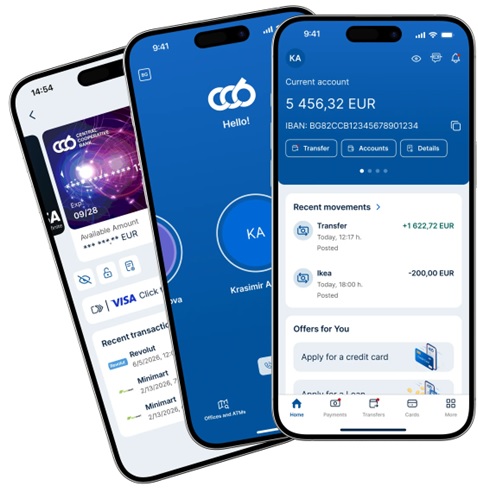
We've created the brand new CCB Mobile to make everyday banking even easier, more convenient, and more intuitive.
At Central Cooperative Bank, we place our customers’ needs and feedback at the heart of the development of our digital services. In line with current trends in digital banking, we are consistently working to provide secure, fast, and convenient mobile banking that simplifies the day-to-day management of your finances and meets your individual needs.
As a result, we have developed the brand new CCB Mobile — with a modern, streamlined design, intuitive navigation, and optimized access to key banking services. The new app also offers options for customizing the home screen so that the information and features that matter most to you are easily and quickly accessible.
WHAT'S NEW?
 A new and modern design A completely revamped look with a clean, modern design that puts the information that matters most to you front and center.
- Easier and more intuitive navigation Get quick and easy access to your accounts, cards, transfers, and the other services you use every day.
- Customizable home screen Customize the home screen according to your preferences and the way you use CCB Mobile.
- The most important thing—always within reach You get quick access to your main banking products and most frequently used features right from the home screen.
- Your finances in one place Keep track of your accounts, cards, loans, and transactions, and manage your daily finances directly from your mobile device.
- Default account Set a favorite or frequently used account to load automatically at the start for even faster transfers and account inquiries without unnecessary clicks.
THE SERVICES YOU KNOW AND LOVE. IN THE BRAND NEW CCB MOBILE.
The new design makes everyday banking easier and more convenient, while retaining the wide range of services and features you use in CCB Mobile.
The CCB Mobile service can be used by adult natural persons who are customer of CCB JSC. The mobile banking application can be used on the following operating systems and mobile devices:
-
Operating system: iOS 18.0+, Android 9.0+;
-
Devices: All iPhone and iPad mobile devices running iOS version 18.0 or higher, and all mobile devices running Android or Huawei version 9.0 or higher;
-
On a specific mobile device, only profiles of users with the same personal identification number (EGN) or foreign national identification number (LNCH) can be activated;
Via CCB Mobile you can:
- pay for parking in the "Blue" and "Green" zones with the new blink parking service—quick, easy, and with no extra fees.
- make instant transfers blink - the fastest interbank transfers in national currency at any time of the year - 24/7, 365 days a year;
- make SEPA instant transfers in euro - the fastest SEPA transfers in euro at any time of the year - 24/7, 365 days a year;
- possibility to confirm transfers with biometric data - fingerprint or facial recognition;
- make domestic or international transfers in EUR and any other foreign currency - between your own accounts, to any recipients and to predefined counterparties;
- make express interbank transfers in EUR through TARGET;
- confirm mass files entered through CCB Online with QES;
- confirm transfers entered through CCB Online with QES;
- make transfers to the budget from EUR and foreign currency accounts;
- buy or sell foreign currency;
- pay utility bills;
- make payments with QR or 10-digit code;
- pay obligations under Property insurance policies "Our Home" from ZAD "Armeec";
- perform bank card management operations - blocking and unblocking debit and credit cards;
- visualization of pending authorizations (blocks) on debit and credit cards;
- submit online requests for cash withdrawals from the accounts registered in your profile at a selected office of CCB JSC;
- create templates and order transfer from template;
- negotiate exchange rates when making transfers and buying and selling currency;
- make inquiries for recent movements (accounted and unaccounted) and statements for a period on all accounts opened with CCB JSC;
- report on transfers received from other banks;
- receive reference information for completed bank card transactions;
- receive reference information for charged Cash back on all cards;
- digitalization of CCB Club cards;
- receive reference information for offices and ATMs - location, address, opening hours and telephone number for contact with direct dialing option;
- locating of your nearest offices and ATMs, incl. ATMs with a cash deposit function;
- perform printing / sharing of payment orders, incl. SWIFT / SEPA confirmations;
- access to Viber ChatBot BEA (Banking Electronic Assistant) via CCB Mobile;
- card transaction sharing/printing;
- direct redirection to a merchant when opening a digital receipt when purchasing from a POS terminal;
- control over your accounts;
- actual information on exchange rates;
- carbon calculator;
- currency calculator;
- programs CCB Club and CCB Bonus;
-
receive messages and push notifications for outstanding and unconfirmed transfers;
- receive advertising messages;
-
option to hide account balance in the "Accounts" menu.
Everything you need to manage your finances on a daily basis—now with a new and more intuitive mobile experience.
SEE HOW EASY IT IS
Discover the new CCB Mobile and its features through our short videos showcasing the app's main functionalities:
-
Registration
-
Checking availability and payment history
-
Transfers
-
Card management
-
Customizing the home screen
On the Bank's website, you will also find an updated guide to using CCB Mobile, which contains detailed information on how to use the app.
YOU ARE ALREADY USING CCB MOBILE
You do not need to visit a Bank branch or re-register.
The new CCB Mobile will be available via a regular app update from the respective app store. After the update, you can continue to use mobile banking with your existing account.
SYSTEM REQUIREMENTS
To use the new CCB Mobile, your mobile device must run Android, iOS, or Huawei:
Store | Operating system version | QR code |
|---|---|---|
 | Android - version 9.0 or higher |  |
 | iOS (iPhone and iPad) - version 18.0 or later |  |
 | Android - version 9.0 or higher |  |
* At a later stage, the minimum supported version of Android will be updated, and customers will be notified in advance. For Huawei users, the new CCB Mobile will be available through the Huawei AppGallery with a slight delay compared to the iOS and Android versions.
LIMITS
 Daily limit for all transfers up to 15 000 EUR
 - Transfers to arbitrary beneficiaries up to 4 000 EUR per 24 hours
- Transfers to counterparties, payment of utility bills and payments to the budget up to 10 000 EUR per 24 hours
-
ADVANTAGES
-
CONVENIENCE
-
SECURITY
 You save not only time but also funds, because the transfers are subject to lower fees compared to the fees on transactions ordered by a bank office.
 You log in by entering a PIN only without entering a username and a password.
Transfers to other recipients are confirmed with a fingerprint and a PIN on Android. All transfers on iOS are confirmed with facial recognition or a PIN.
THE NEW CCB MOBILE
More modern. More intuitive. Closer to the way you bank.
Every story has value.
For more information about the CCB Mobile app, please visit any branch or call:
02/9266 666 and on 02/9266 668,
on the CCB JSC website: www.ccbank.bg or email us at: front@ccbank.bg.
THE BRAND NEW CCB MOBILE
To use the CCB Mobile service, you need:
- To download and install on your SmartPhone/iPhone the mobile application CCBank Mobile App through Google Play, App Store or Huawei AppGallery.
- To file an application for the service here by setting up a username and a password or to receive them in a Bank's office
- To file an application for the registration of one or more mobile devices.
- To visit a Bank's office to activate the service and mobile devices and to present your valid identity document.
If you have already signed up for CCB Online service with QES, you need:
- To download and install on your SmartPhone/iPhone the mobile application CCB Mobile through Google Play, App Store or Huawei AppGallery.
- To enter in the application your user name and password for CCB Online.
- To file an application for the registration of one or more mobile devices.
- To visit a Bank's office to activate the service and mobile devices and to present your valid identity document.
For detailed information how to sign up for the service, see User manual CCB Mobile.
For further information how to sign up for CCB Mobile, contact any office,
at: 02/9266 666 and 02/9266 668,
on the CCB AD website: www.ccbank.bg or write us: front@ccbank.bg.
THE BRAND NEW CCB MOBILE
TARIFF
on transfers in EUR ordered via CCB Mobile
Fee type | EUR |
|---|---|
| Intra-bank transfers between accounts held by the same customer | No fee |
| Intra-bank transfers between accounts held by the different customers | 0.35 EUR |
| Internal bank transfers between accounts of different clients - budget and public debt administrators | 0.35 EUR |
| Interbank transfers (BISERA) | 0.70 EUR |
| Interbank transfers BLINK (up to the maximum limit for transfers to predefined counterparties and random recipients) | 0.70 EUR |
| Interbank transfers (TARGET) | 6.20 EUR |
| Payment of utility bills | No fee |
TARIFF
on transfers in foreign currency ordered via CCB Mobile
Fee type | EUR |
|---|---|
Ordered book transfers | |
| Between accounts of the same client with the Bank | No fee |
| Between accounts of different clients at the Bank | 0.35 EUR |
Transfers in EUR in the European Economic Area (EEA) | |
| Via a payment system for SEPA transfers | 0.70 EUR |
| Via the Trans-European Automated Real-time Gross settlement Express Transfer System 2, TARGET2 | 6.20 EUR |
| SEPA instant transfers in euro ( for amounts below EUR 15 000) | 0.70 EUR |
Transfers in foreign currency other than EUR, as well as transfers in EUR outside the EEA | |
| With value date the next business day | 0.15 %, min. 15 EUR, max. 100 EUR |
| With value date the same business day | 0.15 %, min. 15 EUR, max. 100 EUR, plus 25 EUR |
Transfers in foreign currency other than EUR, as well as transfers in EUR outside the EEA with charging option OUR, in addition to the commissions | |
| - for USD transfers, irrespective of the amount | 27 USD |
| - for amounts up to EUR 12 500 inclusive, or the equivalent amount in another currency (excluding USD) | 28 EUR |
| - for amounts from EUR 12 500.01 to EUR 25 000 inclusive, or the equivalent amount in another currency (excluding USD) | 35 EUR |
| - for amounts from EUR 25 000.01 to EUR 50 000 inclusive, or the equivalent amount in another currency (excluding USD) | 45 EUR |
| - for amounts above EUR 50 000, or the equivalent amount in another currency (excluding USD) | 60 EUR |
CCB Mobile
- Problem with updating CCB Mobile app on Android. Possible solutions.
Try these steps if you're having trouble trying to download and / or update a specific app:
Restart your device
1.Press and hold the Power button.
2.Tap Power off or Restart.
3.If needed, press and hold the Power button until your device turns on again.Clear cache & data from Google Play Services
1.Open your device’s Settings app.
2.Tap Apps & notifications -> App info or See all apps.
3.Tap Google Play Services.
4.Tap Storage - > Clear cache.
5.Tap Clear storage -> Clear all data -> OK.Clear the cache & data of the Play Store
1.Open your device’s Settings app.
2.Tap Apps & notifications -> App info or See all apps.
3.Tap Google Play Store.
4.Tap Storage -> Clear Cache.
5.Tap Clear storage -> Clear all data -> OK.Clear cache & data from Download Manager
1.Open your device’s Settings app.
2.Tap Apps & notifications -> App info or See all apps.
3.Tap Download Manager.
4.Tap Storage -> Clear cache.
5.Tap Clear storage -> Clear all data -> OK. - What should I do if I have forgotten the PIN for access?
It is not possible to generate a new PIN, it is necessary to reactivate the mobile device in a CCB office or via CCB Online.
- Is it possible to use the application on more than one mobile device?
Yes, you can use the application on an unlimited number of mobile devices.
- What if a wrong PIN for access is entered?
After consecutively entering three wrong PIN codes, the access to the application is blocked for an hour.
After entering six wrong PIN codes, the application is deactivated and the mobile device must be reactivated at CCB office or via CCB Online.
- How can I block the access to the application if I have my telephone or tablet lost/stolen?
You must call our 24-hour help line on *5050 and 02/9266 500
- I have enough funds in the card account, but the transfer is not posted. What is the reason?
In order transfers from your card account in internet banking, it is necessary to register for the "Synchron" service. Otherwise, you will only be able to use the funds in the account for card transactions.
For further information how to sign up for CCB Mobile, contact any office,
at: 02/9266 666 and 02/9266 668
on the CCB JSC website: www.ccbank.bg or write us: front@ccbank.bg.
.jpg)